KanoaMES v1.14
Release Date - 2/23/26
Implementation Guidance
Ignition 8.1 Version
The minimum required version of Ignition is 8.1.33
This release package has been tested against Ignition 8.1.51.
- kanoaMES_1_14_8.modl
- ApexCharts-signed 1.0.17.modl
- BIJC_Calendar_Component_v1.8.1.modl
Ignition 8.3 Version
The minimum required version of Ignition is 8.3.3
This release package has been tested against Ignition 8.3.3.
- KanoaMES_83_1.14.8.modl
- Embr-Charts-Ignition83-3.1.0
- BIJC_Calendar_Component_v1.83.1.modl
Summary
We skipped a release version because who wants to update to a software version called 13 and as much as we wanted to continue with updates to the 1.12 release, there are enough significant changes to warrant a new version number.
- Over a 104 clickup tasks addressed in this release.
- Added support for batch, discrete and continuous processes.
- Added inheritable OEE Thresholds to support Enterprise level OEE scoring.
- Added 'downtime by item' analysis.
- Added kanoa logger feature. Provides a method of logging that won't get lost in the weeds along with all the other gateway messages.
- Added image management functions and views.
- Added support for downtime category hierarchy.
- Asset Configuration UI get an updated look and a significant performance improvement on load
- Added the materialized assetTypeHierarchy_MAT table to improve overall sql query performance
- A bunch of improvements have been made to KanoaQuality since introducing version control in 1.12.
Module Versioning
- 1.14 is our first release that is supported on both the 8.1 and 8.3 platforms. To that end, the module name has changed from 'Kanoa MES' to 'Kanoa MES (8.1) or 'Kanoa MES (8.3)'. The version numbering will be identical between 8.1 and 8.3 because under the hood, they are the same.
Automated Testing
This is first release that has undergone automated testing using Playwright and Git Actions. Special shoutout to our newest hire Kennedy for his work on this.
Installer
Our Hawthorn installer has undergone some changes to speed up the installation process.
- Move checking if we need to create changeset table to outside of processChangeLog()
- Schema creation and update has been refactored to break it into smaller packets for each functional area of the application.
- Database schema installer is now idempotent.
New Widgets Added
The hawthorn installer now also handles dashboard and widget installation using the import function, so you can expect a bunch of new widgets and dashboards to be added with each new release. In this release, we've added a number of widgets and dashboards created for our ProveIt showcase at ICC this year...
- Production Loss
- Utilization
- Item State Bar Chart
- Event Notification
- Performance Reasons
- Scrap Reasons
- Lot Bar Chart
- Lot Quantity Bar Chart
Tree Selector Changes
Over time, we have improved the functionality of our selectors to support drag drop, multi-select and breadcrumb selection, but this led to a number of similar copies of the tree selector. In 1.14.3, we have condensed all the changes into one single selector whilst improving its overall operation.
Updated Selectors
- kanoa/core/templates/selectors/assetSelector
- kanoa/core/templates/selectors/tree/selector
Moved Selectors
- kanoa/core/templates/selectors/assetDropdownSelector ← moved from asset folder
- kanoa/core/templates/selectors/assetGroupSelector ← moved from asset folder
- kanoa/core/templates/selectors/assetModeSelector ← moved from asset folder
Removed Selectors
- kanoa/core/templates/selectors/asset
- kanoa/core/templates/selectors/treeSelector
This will be one to search for using the keyword search utility for references to the moved and removed selectors.
System function intellisense and documentation
- All 643 of our system functions have been reviewed and re-written to standardize and correct any mistakes in the documentation and examples given. A big shout out to Nicole for taking that on!
- As part of that process, we did discover some system functions that deviate from the standard in terms of return values and they have been modified. We have fixed all instances in the kanoaAPP and tags that use these functions, but if you have overridden any views that called them, you'll need to modify them. Fear not, we have created a handy utility built into the application that will allow you to search through all projects, scripts and tags for a list of keywords we have identified as having changed.
Keyword Search Utility
As we prepare the platform to support manufacturing processes such as batch and continuous as well as discrete, we had to make some refactoring choices that may affect existing installs where certain views have been overridden. If this is a first time install, then install away. If you are updating an existing install, you can use the keyword search utility to search for a list of keywords we have identified as having changed.
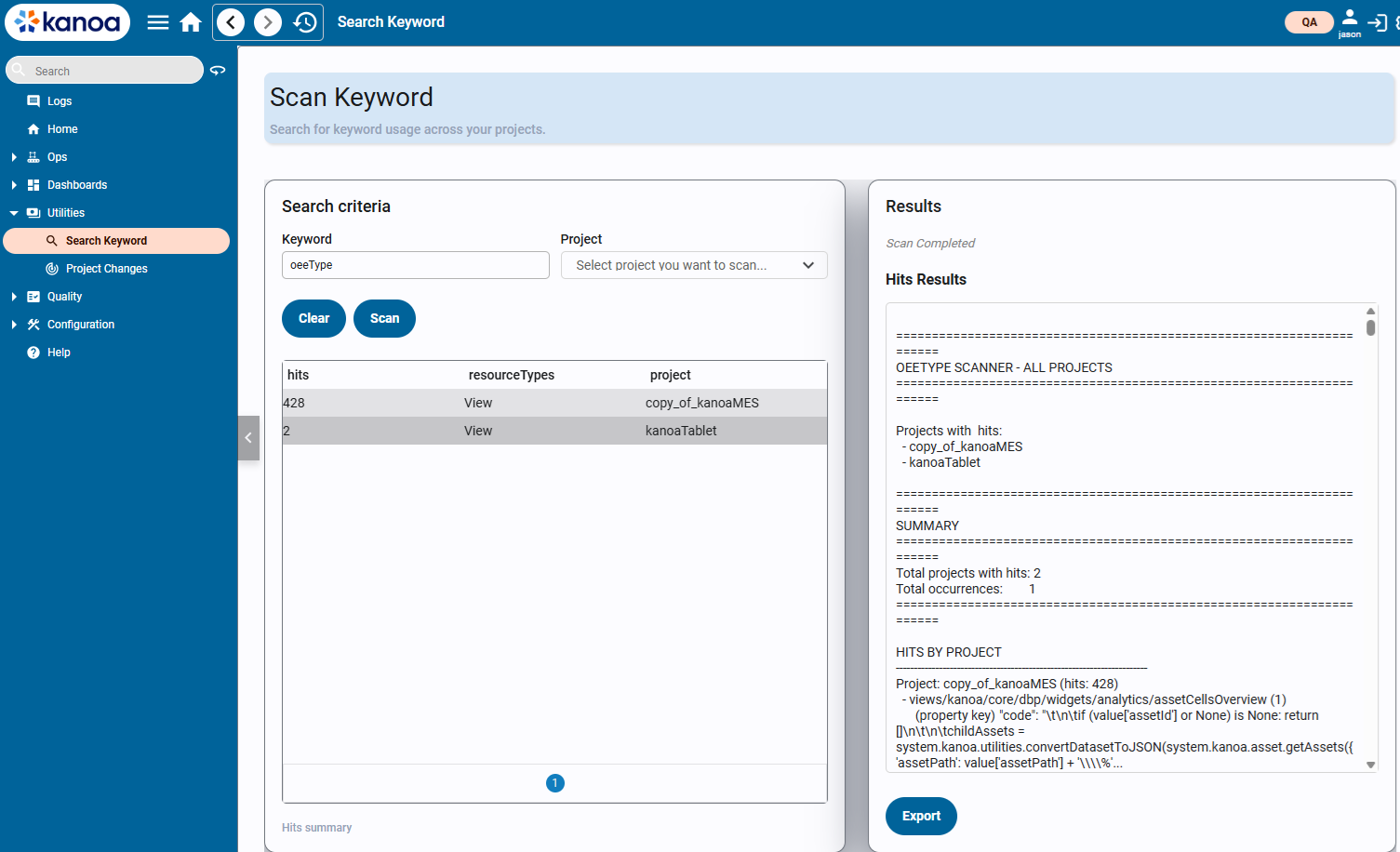
As this new utility has only just been added, it cannot be run prior to updating the module. Hopefully you are updating a development environment. If you are directly updating a production environment (not recommended) then you should check your custom projects, views, scripts and tags from within the ignition designer. For future updates, this utility can be used prior to updating.
Here is a list of changes and views that have been touched. Search for the following keywords.
- 'oeeType' - Was replaced with 'oeeEnabled'
- 'system.kanoa.item.addItemUnit' - Now return a tuple
- 'system.kanoa.asset.addAssetType' and 'system.kanoa.asset.updateAssetType' - Now return a tuple
Any references within the kanoaAPP project will have already been updated, so you are really only looking for references to these keywords in projects, view and scripts that have overridden view or custom stuff.
Feel free to submit a support ticket if you would like help with updating from a previous version. As always we recommend you install on a dev server prior to deploying to production.
1.14.8 Release - 4/19/26
Ops
- Updated system.kanoa.dashboard.getWidgetFilters() to fix edge case where assetId wasn't being set correctly.
- importAssets() function failed when the target system didn't have the same state categories as the source system.
- kanoaMES module installation prevents the Vision Client Launcher from working. This is fixed.
- Tree Selector filtering is not working. This is fixed.
- Table data is being translated even if it is not required. This is fixed.
- Data is being translated even when there is no need. This is fixed.
- State treeSelector search is not working. This is fixed.
- Lot Manager doesn't work if an asset is selected. This is fixed.
- Breadcrumb is not ordering alphabetically in dropdown. This is fixed.
- Long state names and categories cause the state editor to be cutoff. This is fixed.
- Adding a new state category doesn't show up in the state Category Path label when adding a new state category. This is fixed.
- After adding a new state category, that category doesn't show up in the state editor, until that view is refreshed. This is fixed.
- Unable to have the same state name in different state categories This is fixed.
- Improved sort ordering of treeSelector. First orders roots items (No path), then by sortOrder, then alphabetically including mixed ints and strings i.e. 1,2,3,3a,4.
- Asset Overview Summary view doesn't respect 'Current Shift' selection. This is fixed.
- Reliability KPI's view shows scheduled Production as 'Unscheduled'. This is fixed.
- FK Constraint on stateEvents was looking at assetStateId rather than assetId. This is fixed.
- Added more information and more descriptive tooltips about the calculations on the assetCard view.
- Schedule doesn't resume after ending a manual mode. This is fixed.
- Date selector doesn't respect asset production date settings in Downtime Analysis page. This is fixed.
- Moved addCountEvent(), updateCountEvent(), addCounterEvent(), updateCounterEvent() logging to kanoaCounterEvent trace to prevent flooding of log errors when duplicate counterEvents are coming in.
- Run Review Event row is showing dates in UTC time. This is fixed.
- Asset Import has been significantly sped up with the addition of two new functions upsertAssetStateLinks() and upsertAssetModeLinks().
- Downtime by Item Pareto line isn't working. This is fixed.
- Time issue with getModeEvents() if server times are not synced. This is fixed.
- Added system.kanoa.event.deleteZeroedCounts() to clear zero counts after an hour of running so waste counts start auto calculating.
- Added try catch to system.kanoa.event.addStateEvent()
- counter UDT does not properly record itemId, workOrderId, or itemStateId. This is fixed.
- Cannot assign a role asset. This is fixed.
- Analysis screens don't all use new dateSelector and downtimePieChart issue. These are fixed.
Trace
- Lot Nodes with a negative quantity are now connected when building a trace graph.
- system.kanoa.lot.getLotEvents() now performs a tie break with lotEventId when multiple lotEvents have the same timestamp and 'getLastEvent' param is set to true.
- Added workOrderName to lotOperations panel.
Quality
- Added a filter by asset group in the schedule view to allow for filtering checks by a group of assets.
- Added a filter by asset group to the check sheet summary screen.
- You can now add and show images for each check item.
- Archived Tests are being triggered. This is fixed.
- Picklist static data doesn't update to latest. Changed to use an UPSERT on install.
- Trigger button does not cause a calculated check item to trigger. This is fixed.
- QDS assetInfo tag is no longer required to set up asset mode, item and shift triggered check sheets. 'Enable Quality' trigger can be set for OEE enabled assets under asset configuration.
1.14.7 Release - 4/1/26
Ops
- Make Work Order Title configurable. You can now set a workOrderTitle different from the workOrderName such as 'wo# - Batch #' and that is what is displayed for the work order on all screens. If no workOrderTitle is set, the the workOrderName is displayed.
- system.kanoa.utilities.convertJsonToMarkdown() has been modified to handle titles.
- Run Chart has been updated to display work order as defined in workOrderTitle.
- Item not automatically selected in mode editor. This is fixed.
- Run Review table doesn't always load up correctly the first time. This is fixed.
- Editing a modeEvent prevents schedule from starting new run. This is fixed.
- Schedule timer not honoring its interval and starting runs a minute late. This is fixed.
- Added configurable display option for filtering out oeeEnabled assets below the line.
- DowntimeByItem is showing seconds not minutes and doesn't match category downtime. This is fixed.
- Exception case with updateShiftEvents() when asset configuration is modified. This is fixed.
- assetOEEState view is now configurable on the Asset Overview screen. Can create custom views or select from a drop down for the view to use for assets.
- Have added a users security functions available to them to the tooltip on their avatar.
- Added check for null workOrderId in addProductionOrderMetaData() and getProductionOrderMetaData().
- ImportAssets() does not preserve the sort order of the imported assets. This is fixed.
Trace
- Lot Event qty is now rounded up to 1 decimal place on the lot trace.
- Implemented snake layout for long-line trace sequences.
- Depth button missing from Trace Graph and cannot set to shallow. This is fixed.
- Updated security on lot events to require a user to have the 'configureLots' function in their roles. Previously it was looking for 'editOperations'.
Quality
- Cannot clear a tolerance from a check Item. This is fixed.
- Added chkItemIdList to system.kanoa.quality.config.getChecks().
- Added chkItemEventIdList to system.kanoa.quality.event.getChkShtEventItems().
- If a check item is set to required and fails, user is asked to enter a comment.
- Unable to launch a tree string check preview or run the check. This is fixed.
1.14.6 Release - 3/22/26
In this release, our kanoa themes have been refactored to address some issues with components in dark mode.
Ops
- Users are now prevented from deleting the navigation item from navigation.
- Added server timezone checks to the debug logs.
- Added kanoaMES Managed Tag Provider that now holds install and license/trial status information.
- We now pass workOrderId and itemId to the message when clicking on a schedule, order or item from the Run Control screen.
- Added new function system.kanoa.event.getOEESummary() that allows filtering by item.
- Added ability to create counters from asset config page.
- Added fixes for Counter Editor with general Counters.
- Updated assetOEE count tags to use addCounterEvent() instead of addCountEvent().
- Added the -beta1 or -rc1 to the installed version tag.
- Drag-and-Drop Scheduling is broken. This is fixed.
- Added info bar when importing items.
- Fixed default asset selector settings on various views.
- No constraint on counters having a counterType. This has been fixed.
- Increased workOrderMetaData metaDataValue to VARCHAR(MAX).
- assetCard widget is not picking up tag data. This is fixed.
- assetSelector doesn't show selectedPath in the breadcrumb when a parentPathList is provided. This is fixed.
- Timezone error with system.kanoa.date.getClientTimezoneOffsetMins() when gateway server is set in UTC timezone and not etc/UTC. This is fixed.
- Hawthorn won't install due to gatewayName difference from a gateway Backup on a clean install. This is fixed.
- Refactored themes to better support dark mode on all components.
- Scheduling options for intelligent scheduling and shiftTimeOnly are now configurable by asset.
- Added info popup that deleting an inherited shift deletes it for all assets.
- Added serialization configuration to navigation.
- Fixed cosmetic issue with OEE Enabled label in asset configuration screen.
- Added more support for custom production Report in Run Review screen. Custom reports can be created and pointed to using the '_productionReportViewPath' asset attribute.
- Added a new order analytics view under kanoa/mes/analytics/orders that shows what resources the process order ran on and the total run hours for each resource, as well as total run hours across all resources. This information can also be seen in the existing Orders screen as an additional tab of information.
- system.kanoa.event.getCounterEvents() can now be passed a list of counterIds.
- Added new function system.kanoa.attribute.getAttributeEventTotals().
- system.kanoa.attribute.getAttributeEvents() now returns assetName.
- Create shift name throws nuisance error in logs. This is fixed.
- system.kanoa.asset.addCounter() now checks for null userId.
- treeSelector component has incorrect default param. This is fixed.
- Item custom properties value is now a varchar(max).
- When an asset type is changed from a site to anything else, the timezone setting is now cleared.
- Creating invalid asset hierarchies such as a site under a site no longer breaks the Asset editor.
- system.kanoa.item.getItemAttributes isn't respecting an itemIdList. This is fixed.
Quality
- Export check sheets fails. This is fixed.
- Auto checks aren't working. License check was moved to new KanoaMES tag provider. This is fixed.
- Added infobar when exporting and importing checksheets.
- Multi-Select shows as an option at times where it doesn't really make sense, and then unchecks itself when saved, and doesn't work when checked. This is fixed.
- Tree Checks Value Entries are populating more check fields than intended. This is fixed.
- Updating to new quality version doesn't set it to released. This is fixed.
- If you don't select a specific entry option for a boolean check, there's no way to complete the check. This is fixed.
Trace
- Bad Lot Operation Ordering in Lot Trace. This is fixed.
- lotEvents panel is showing in utc time. This is now showing in client timezone.
- Added ability to select a lot or node in the trace graph and have that now be the focus.
- Added ability to edit Lot Events and lot Operations from the trace graph.
- Trace Graph Styling has been updated.
- Added ability to adjust Trace Default Depth and make the setting more obvious.
- Added properties to node chart component to add ability to turn off dots, Add default styles for nodes and edges (which can be overridden by individual mode and edge styles) and added selected style for nodes and edges, including the cursor.
- getLotEvents() and getLotQty() would fail if an empty list was passed for lotIdList. This is fixed.
- Trace Graph now returns the node information for the selected node or edge in the selected property.
- Increased the size of lotAttribute table columns for lotAttributeName to varchar(255) and lotAttributeValue to varchar(max).
- Lot Quantity Bar Chart Widget does not respond to lotUpdate message. This is fixed.
- Added Lot Queue Widget.
- addRouteStepEvent does not work with documented parameters. This is fixed.
1.14.5 Release - 2/16/26
Ops
- Tree Selector drop down arrows don't show in dark mode. This is fixed.
- Dragging and dropping assets in the asset tree editor doesn't work anymore. This is fixed.
- Item Classes aren't always picking up the proper contrasting color. This is fixed.
- Clicking the Schedule link in the Asset Operations screen takes you to a blank calendar, not the schedule for that asset. This is fixed.
- When you make a new unit in the Item Rate Editor, it's ID is displayed in the dropdown instead of the unit name. This is fixed.
Quality
- Shift is not updating in the check sheet This is fixed.
- Turned off the breadcrumb in the Check Item Editor for attributes to prevent the selection of an attribute class.
- Added chkShtInfo param to QDS custom scripts.
- Cannot create a new check sheet as assetRequired error is thrown. This is fixed.
Trace
- Improved trace graph layout algorithm to avoid overlapping/unclear edges, and also avoid nodes being placed on top of edges. Also standardized node width and height.
- LotAttribute values not showing on trace graph. This is fixed.
- Added ability to delete Lot Operations and Lot events from the trace graph.
1.14.4 Release - 2/11/26
Ops
- Added a constraint to itemNames. Any duplicates will be renamed and disabled.
- Production order screen is now cleared when a filter changes. This is to ensure 'get data' button is pressed after selecting show actual qty.
- Orders are set to inActive on a clean install. This is fixed.
- Import Asset. We now show an error when asset types do not exist in target system.
- Item State Linking doesn't fully inherit from the Item State menu. This is fixed.
- Added tooltips to item rate editor.
Trace
- Lot Manager does not work if an asset is selected. This is fixed.
1.14.3 Release - 2/5/26
Installer
- Added Hawthorn installer tag. Information on hawthorn install status is now displayed on the header.
- Added gateway name check to hawthorn installer to prevent updating a database schema from two different systems i.e 'prod' and 'dev'. We call this one the miller effect;)
- Hawthorn installation info and gateway wrapper logs can now be exported and attached to a helpdesk via a button on the header.
Ops
- Tree Selectors merged and refactored.
- Breadcrumb sort order is now correct.
- Improved spacing and sizing of breadcrumb selector.
- Enterprise OEE summary screen rollup is off. This is fixed.
- Production Order view takes a long time to load when there are 1000s of entries. This has been fixed.
- Downtime editor widget not working. This is fixed.
- ItemClass editor toast messages are wrong. This is fixed.
- Duplicating an asset does not copy that asset's Auto-Schedule Mode settings. This is fixed.
- Asset Operation navigation configuration has been moved to it own configuration section.
- system.kanoa.asset.getOperationalAssets() was broken with change to 'oeeEnabled' parameter. This is fixed.
- Fixed dark theming in message popup.
- Updated Asset Overview Main Summary to include Current Shift / Current Run drop down.
- Operations scheduler calcDurationEvent() throws error when package count is not set. This is fixed.
- Hide 'View Not found' and various asset operation view dashboard selection fixes.
- Added targetCount and oee to asset InfoPanel.
- Added individual thresholds for OEE, A, P, Q elements.
- Allow Work Order Schedule Qty Popup to be Optional.
- assetShiftOEEGraph widget did not work for shiftIndex of 0 (current shift). This is fixed.
- Updated dark theme to fix markdown component issue.
- Added material description to multiple views.
- Added system.kanoa.order.addProductionOrderSource().
- Added kanoaScripts.custom.stubs.createLotTable(lotData) stub
Quality
- Added constraints to chkSht Table (DF_assetType_enabled, DF_chkSht_itemReqd, DF_chkSht_assetReqd)
Trace
- Revamped lot manager to add serialization selection for lot numbering and default dates etc. when creating lotOperationEvents.
- Added config view for adding serialization.
- Added lotOperationExecutor view.
- TraceGraph fails on prevLotNodeId. This is fixed.
- lotTraceGraph leaves dangling lotEvent when there are duplicate events. This is fixed.
- Added client timezone offset to nodes in trace graph.
- Lot Trace detectCycle not functioning correctly. This is fixed.
- Add reset view position to trace graph whenever the lotId changes.
- system.kanoa.lot.getlotActivity() now returns lotOperationEventId and has been optimized.
- Trace Graph can generate overlapping and misleading arrows. We have simplified the trace to return just immediately connected nodes and increased the horizontal gap between each node.
- Fix traceGraph when displayed in dark mode.
- Added an onEentClicked when an edge (lotEvent) is clicked in the trace graph.
- Fixed return tuple from system.kanoa.lot.updateLotField.
- Reorganized node information on info panel in trace graph to include lot attributes.
- Added an 'export data' button to traceGraph. Wonky traces can now be submitted to a support ticket.
- system.kanoa.lot.getLotForLotOperationEvent() does not take in lotName. This is fixed.
1.14.2 Release - 1/17/26
Ops
- Double click edit is not working on orders config. This is fixed.
- Order coloring by status in operations schedule view did not work if no due date was set. This is fixed.
- Items do not show up if no item classes have been created. This is fixed.
- Install error on mesSchema_lot:[mes].[lotOperation]:6. This is fixed.
- Updated order tab viewer to prettify workOrder meta data.
- 'Close/Confirm' in Attribute Detail Editor still deletes link record. This is fixed.
- Added assetTypeHierarchy_MAT table to improve sql query performance.
- Duplicating an asset duplicates the Sort Order, causing a conflict. This is fixed.
- Renaming 'site' to 'Site' for assetTypes breaks timezone selection. This is fixed.
- system.kanoa.asset.addAssetType() and system.kanoa.asset.updateAssetType() now return a tuple.
- Asset types now have a reservedBySystem bit to prevent editing of required asset types (site and line).
- Added system.kanoa.order.updateProductionOrderState() and system.kanoa.order.deleteProductionOrderState() functions.
- Added ability to configure order states from the UI.
- Order states now have a reservedBySystem bit to prevent editing of required states.
- Shift Scheduling - Custom weekly recurrence not working correctly for weekend shift starting after 8pm. This is fixed.
- Special characters are no longer allowed in the asset name. This is because the ignition tag path does not support special characters like a comma.
- Drag and drop now working on asset states and state category tree.
- We now prevent users from editing or entering a mode that starts or ends in the future.
- Assets are going into their scheduled mode even if 'Auto-Scheduled' is turned off for that mode. This is fixed.
- Adding itemStateLinks to general counter breaks countEditor. This is fixed.
- Updated woViewer to prettify workOrder meta data.
- Guest User allowed to view assets when configuration asset view is set to false. This is fixed.
- Hard to tell that the white circle on the shift and operations schedule editor is a color picker. This has been improved.
- itemId tooltip is wrong in item editor. This is fixed.
- Downtime editor widget error. This is fixed.
Quality
- Export / import quality sheet doesn't create json correctly if there is an apostrophe in the picklist values. This is fixed.
- Occasionally cannot change version on check sheet. This is fixed.
- Close button in Attribute Detail Editor continues to delete tolerance. This is fixed
- Quality timers throw a 'QDS Expired log message every minute if Quality is not licensed. Timers are now disabled if QDS is not active.
Trace
- Similar Lot nodes are shown a separate when they should be the same if the last input event from a lot node, is also the same one a new lot operation is outputting to, but starting as an output. This is fixed.
- Increased popup width of outputLotEventEditor.
- Lot operation Screen can't see text in dark mode. This is fixed.
- Trace is not linking lot nodes when a lt is received after the timestamp of lot operation that consumes it. This is fixed.
- Added a screen for editing lot names.
1.14.1 Release - 1/8/26
Ops
- Added params for lotOperationIdList and lotOperationList to system.kanoa.lot.getLotEvents()
- Operations scheduling color coding doesn't work if config param is not set. This is fixed.
- Added 'downtime by item' analysis to the kanoa/mes/analytics/downtimeApex view and kanoa/core/dbp/widgets/analytics/assetDowntimeBarChart dashboard widget.
- Modified kanoa/mes/asset/overview/assetSummary/assetSummary view to correctly calculate aggregate OEE scores by time weighting production runs.
- Added system.kanoa.image functions for image manipulation.
- Added system.kanoa.file functions for file management.
- assetOEE UDT Work Order Change Script references an invalid tag. This is fixed.
- assetOEE UDT State change script for contiguous downtime events messes with last running state. This is fixed.
- system.kanoa.asset.adjustTimeForSite() has been removed.
- system.kanoa.utilities.getGatewayTimeZoneOffset() has been deprecated and all widgets now point to system.kanoa.date.getGatewayTimeZoneOffsetMins().
- New view kanoa/mes/analytics/enterpriseOEE has been added that calculates and show OEE scores for every level of an enterprise.
- Inheritable OEE thresholds has been added.
- 'Input Materials' tab has been removed from Item Configuration. This has been replaced by Trace.
- Add Batch capability. Assets can now be set with the process type of 'Batch' and standard rates can be set to 'Batch time in mins'. OEE Performance is then calculated as Batch time / runtime.
- Asset Import doesn't add items. This is fixed.
- Added logger view to App.
- When duplicating an asset, we also need to duplicate the sort order. This is fixed.
- updateShiftEvents() throwing exception if enterprise was set to 'oeeEnabled' and then disabled. This has been fixed.
- Added support for downtime category hierarchy.
- Updated scheduling to support batch processes.
- Add unique constraint to stateEvent and counterEvent. Fix for mqtt backflush.
- Saving a new dynamic attribute doesn't work in attribute editor. This is fixed.
- Specify some default dashboard on installation instead of a blank screen. Welcome dashboard is now displayed.
- Scheduler shows orders that cannot run on an asset if asset has no item links. This is fixed.
- Added new function system.kanoa.schedule.calcEventDuration() that calculates the expected duration it will take to complete a production run for a given item
- Asset selection is no longer cleared after making a change to an asset's configuration.
- assetShiftOEEGraph widget was not filtering out non-production mode events skewing the oee calculation. This is fixed.
- Added system.kanoa.order.addProductionOrderState().
- ModeDataEditor allows setting a modeEvent in the future. We now prevent future dates from being set.
- Unable to view actual qty in Production Orders table. This is fixed.
- The Add buttons on the Production Details counts screen stop working after the first button press. This is fixed.
- Cannot add counts if no counts exist in count Editor widget. This is fixed.
- When making a new enterprise, we get an unnecessary Toast message and the Asset Tree does not refresh automatically. This is fixed.
- Dynamic Attributes editor isn't working. This is fixed.
- Shift Scheduling - Exception thrown when saving recurring shift. This is fixed.
- system.kanoa.item.updateItemAttribute() fails. This is fixed.
- Import dashboard creates copies of old dashboards, but they are missing widgets. This is fixed.
Quality
- Added system.kanoa.quality.image functions for quality check image capture and storage.
- When duplicating a check sheet, the new check sheet doesn't get a Status. This is fixed.
- Can't delete a check sheet if it's been used. This is fixed.
- Check Item Triggers get cleared out every time you revise a check sheet
- QDS Test Fail Actions - Issue Check Sheet should limit its options to Released checks. This is fixed.
- Can't delete a check sheet if it's been used. This is fixed.
- Cannot add comments to a check item. This is fixed.
- Gateway Admins and users with configureQuality can now schedule a checksheet in draft or in revision.
- Cannot disable checksheets that are released. You can now.
- When 'Items' are enabled for a checksheet, you can select any item regardless of what was configured. We now limits the item options when scheduling.
- Quality sheets in non-Released status can be triggered. This is fixed.
- No way to revise images in check sheets. This is fixed.
- Duplicating a check item changes the name of the check item, but if you continue duplicating it will re-use the new name. This is fixed.
- Cannot put a checksheet back into revision if it has a trigger check. This is fixed.
- Any file can be attached to a check sheet as an image. Files are now limited to images.
- Images associated to quality tests aren't easily accessible when reviewing the test or data. You can now view images by double clicking on the check item in the analysis details view.
- Import check sheet is failing if a check sheet as a trigger check item. This is fixed.
- Automatic tests aren't given a "taken on" or "taken by" date, or a shift. This is fixed.
- Checksheet configuration will accept invalid tolerances/range values. We now validate tolerances.
- You can "trick" the Quality Check Sheets to let you revise a check that's released. This is fixed.
- Cannot link an item with an itemSet if that item is already linked with another itemSet. This is fixed.
- Check Details - Most recent record doesn't get a timestamp in Row View and doesn't appear in Column View. This is fixed.
- Checksheet not obeying Timed Interval settings if delay is not set. This is fixed.
- Quality - Shift heatmap throws error if no shifts are defined. This is fixed.
Trace
- detectCycle() function error in traceGraph when a lotOperationEvent has two output events and the lot was new. This is fixed.