Machine Setpoints Interface
Created using: Kanoa MES v1.14.2
Last updated: February 6, 2026
Download Resource
Overview
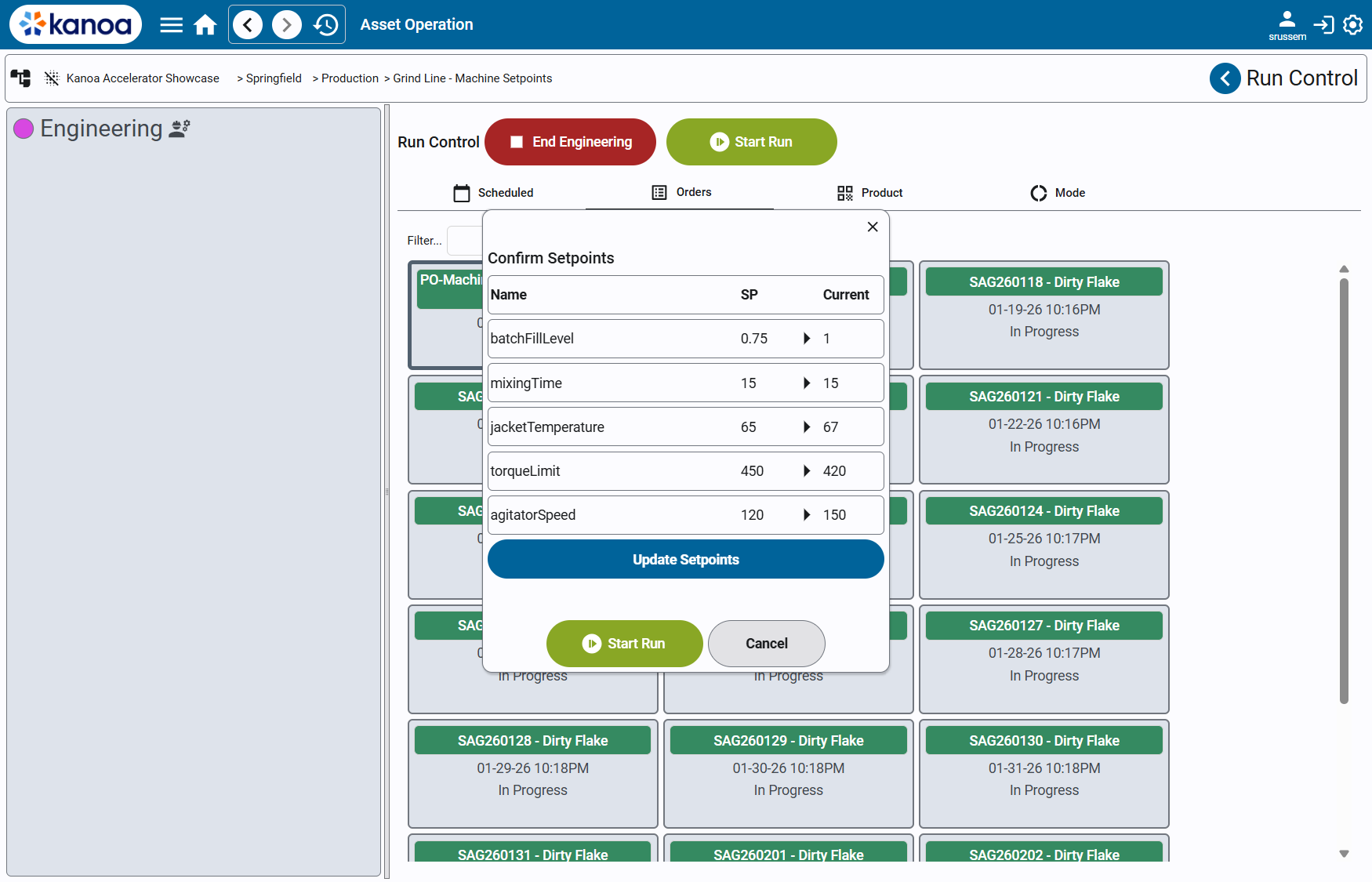
The Machine Setpoints Interface Accelerator demonstrates a reference pattern for driving machine setpoints from Production Order metadata in Kanoa MES.
In many manufacturing environments, machine configuration and recipe values are determined upstream (ERP, planning systems, engineering definitions) and must be applied consistently at run start. Kanoa MES provides the tools to implement this cleanly, but the exact workflow—automatic vs operator-confirmed—varies by plant.
This accelerator demonstrates an operator-confirmed setpoint workflow using:
- Production Order Metadata
- Asset Custom Attributes
- Custom Perspective views
- A built-in Kanoa run-start hook (
_runSetupViewPath) - Standard Ignition tag writes and Kanoa operational APIs
The result is a flexible, transparent pattern that can be adapted to many machine and recipe models.
How It Works
This solution enables you to:
| Feature | Design |
|---|---|
| Attach machine setpoints to a specific work order | By adding those values as Production Order Metadata named "Machine Setpoints" |
| Intercept run start to review setpoints | By using an asset’s _runSetupViewPath Asset Custom Attribute |
| Compare desired vs current machine values | By referencing a machine UDT instance via an Asset Custom Attribute |
| Commit setpoints to the machine | By writing to Ignition tags on operator confirmation |
| Start the run through standard Kanoa logic | By calling system.kanoa.event.assetOperationChange() |
Kanoa MES Features Used
- Production Orders
- Production Order Metadata
- Asset Attributes
- _runSetupViewPath
- Asset Operation Control
Implementation & Configuration
Included Resources
This accelerator package contains:
Perspective Views
| View | Description |
|---|---|
accelerators/setpoints/addSetpointsToOrder | Utility screen to attach setpoint metadata to an order |
accelerators/setpoints/main | Run-start popup used to review and commit setpoints |
accelerators/setpoints/row | Row component used in the main view’s Flex Repeater |
Machine Tag Model
machineUDT.json— a sample machine UDT defining writable setpoint tags
Implementation
Step 1 — Import the Views and Machine UDT
Import the provided Perspective views and the machine UDT definition into your Ignition project.
Create an instance of the machine UDT to represent the machine you will be sending setpoints to.
This UDT can be connected to real PLC tags, a simulator, or a testing tag provider.
Step 2 — Configure the Asset’s Machine UDT Path
On each asset that should support machine setpoints, add a Custom Attribute:
- Name:
machineUdtPath - Value: Tag path to the machine UDT instance
Example:
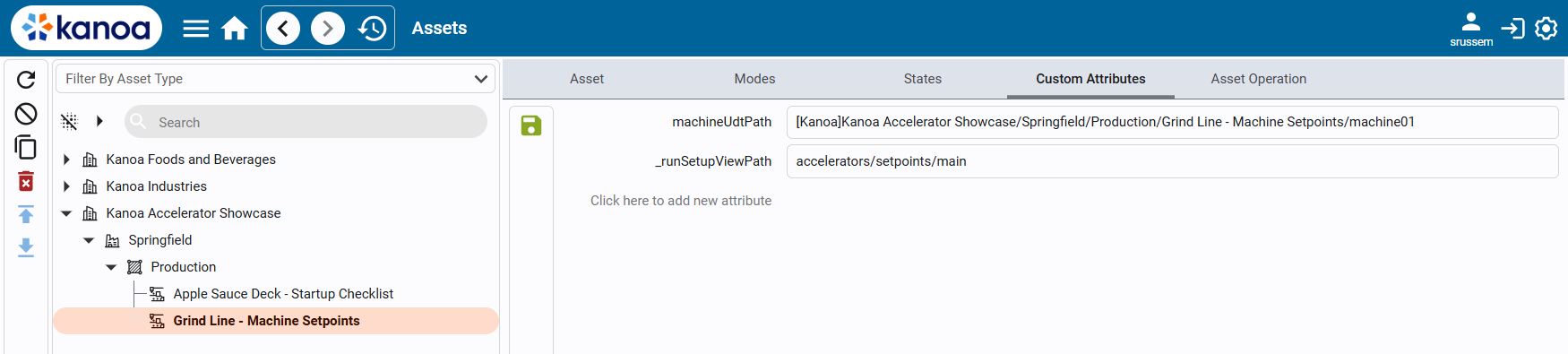
This tells the setpoints popup which machine it should read from and write to.
Step 3 — Configure the Asset Hook (_runSetupViewPath)
Configure the asset’s _runSetupViewPath Custom Attribute to:
accelerators/setpoints/main
This built-in Kanoa hook tells the system:
“When an operator presses Start Run, open this custom setpoints view instead of immediately starting the run.”
Step 4 — Attach Setpoint Metadata to a Work Order
Machine setpoints are stored on the order as Production Order Metadata.
The accelerator uses the metadata Name "Machine Setpoints".
The value is a JSON object where keys correspond to machine tag names:
{
  "agitatorSpeed": 120,
  "mixingTime": 15.5,
  "jacketTemperature": 72,
  "torqueLimit": 40,
  "batchFillLevel": 0.85
}
You can add this metadata via script using system.kanoa.order.addProductionOrderMetaData or by using the included utility screen accelerators/setpoints/addSetpointsToOrder.
Step 5 — Run the Order and Commit Setpoints
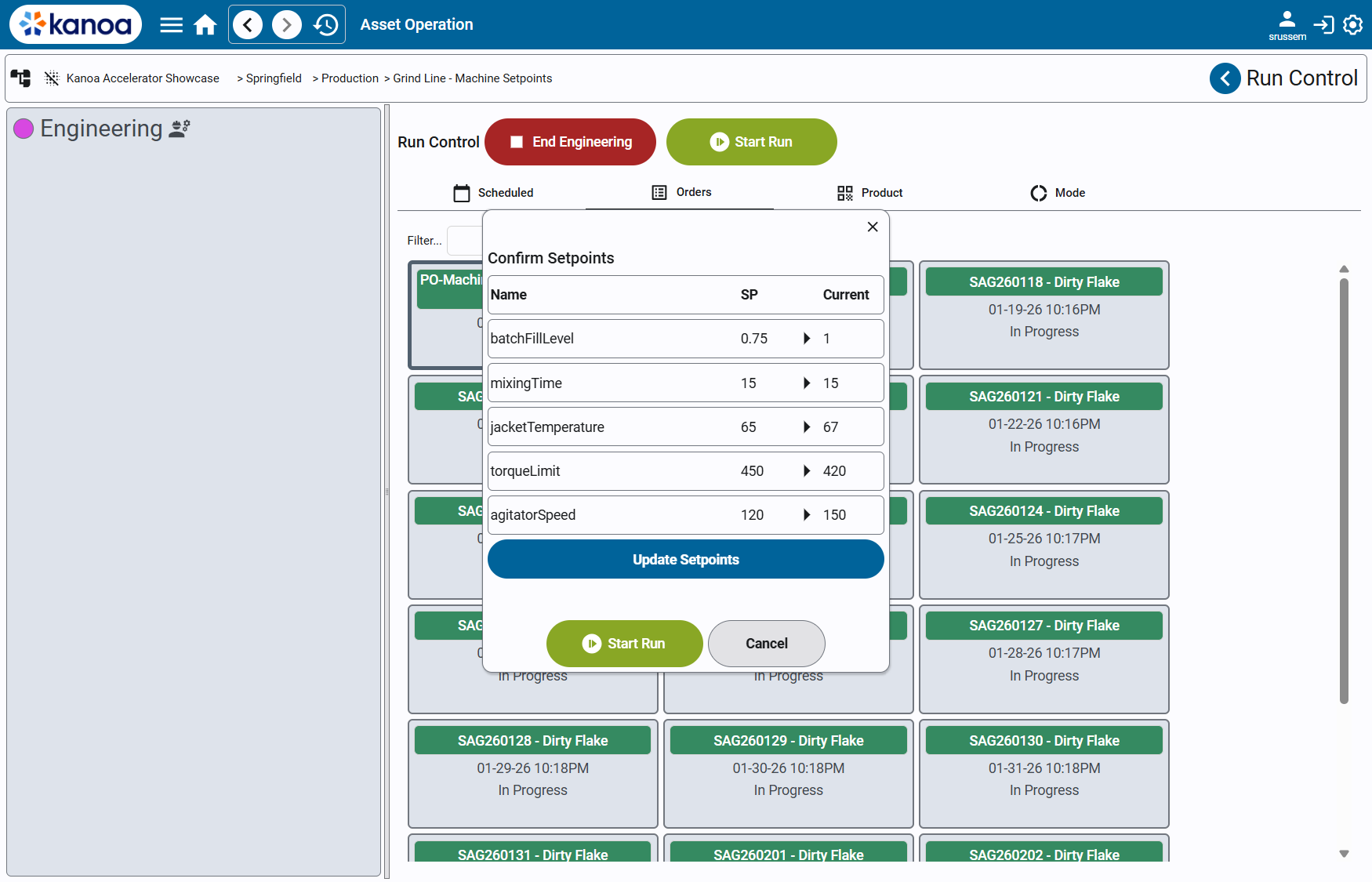
- Open the asset’s Run Control screen.
- Select a Production Order with Machine Setpoints metadata.
- Click Start Run.
- The Machine Setpoints popup will open instead of starting the run.
- Review the desired vs current setpoints.
- Click Send Setpoints to write values to the machine.
- Click Start Run to begin production.
Detailed Walkthrough
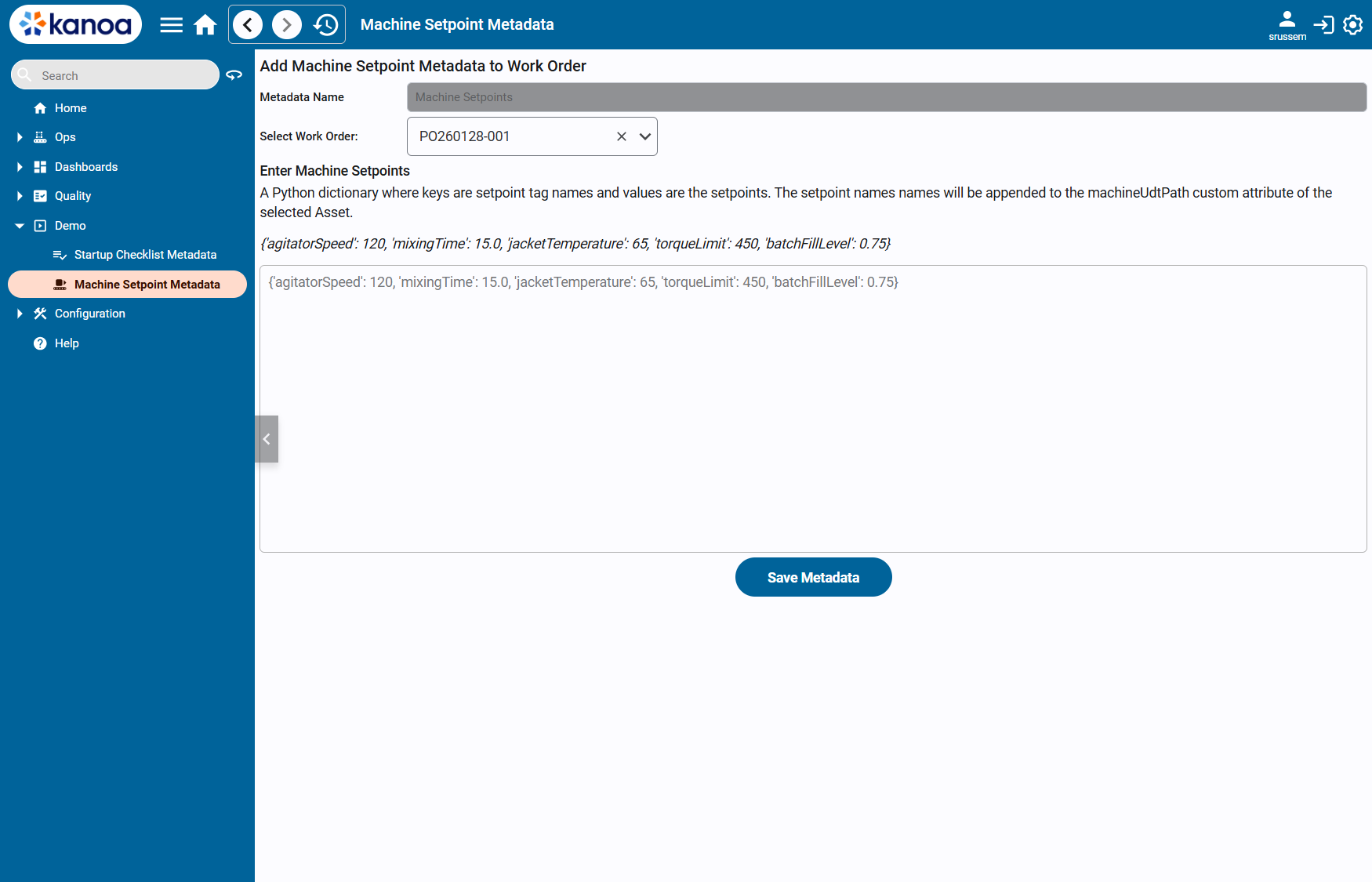
accelerators/setpoints/addSetpointsToOrder
Purpose
Utility screen used to quickly attach or update machine setpoints on a Production Order, primarily for demos and non-ERP environments.
Key Features
- Select a Production Order
- Enter setpoints as JSON
- Save metadata directly onto the order
Implementation Details
When Save is pressed, the view:
- Validates the selected work order
- Checks for existing "Machine Setpoints" metadata
- Adds or updates the metadata value accordingly
- Provides success or warning feedback
accelerators/setpoints/main
Purpose
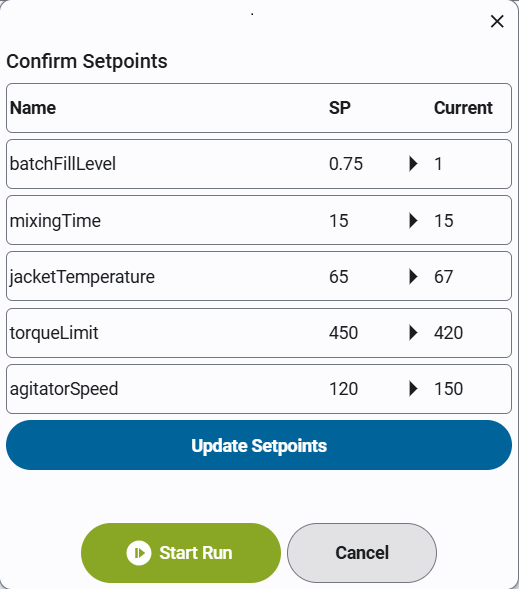
This is the primary run-start popup view launched via the asset’s _runSetupViewPath.
Responsibilities
- Resolve the target machine via
machineUdtPath - Load current machine setpoint values
- Load desired values from order metadata
- Display a comparison table
- Allow operators to commit setpoints
- Start the run after confirmation
Setpoint Loading
When opened, the view:
- Reads
workOrderIdandassetIdfrom popup parameters - Loads "Machine Setpoints" metadata from the order
- Reads current values from the machine UDT instance
- Builds a Flex Repeater dataset showing:
- Setpoint name
- Desired value
- Current value
Operator Interaction
- Send Setpoints writes the desired values to machine tags using Ignition tag writes.
- Start Run calls
system.kanoa.event.assetOperationChange()to begin production. - Cancel closes the popup without writing or starting.
accelerators/setpoints/row
Purpose
Presentation-only row component used in the Flex Repeater.
Features
- Displays setpoint name, desired value, and current value
- Supports a header row for column labels
- Keeps all logic centralized in the main view
Binding Structure
Each row expects:
labelsetpointValuecurrentValueisHeader
Conclusion
Common Use Cases
This accelerator is useful for:
- Recipe and setpoint-driven manufacturing
- Operator-confirmed machine configuration
- Reducing setup errors at run start
- Demonstrating order-to-machine integration patterns
- Building foundations for more advanced recipe management
Expansion Opportunities
This accelerator can be extended to:
- Automatically apply setpoints without operator confirmation
- Add tolerance checks or validation rules
- Highlight mismatches between desired and current values
- Log setpoint application for auditability
- Support recipe versions or approvals
- Integrate with Kanoa Quality for specification enforcement
Summary
The Machine Setpoints Interface Accelerator demonstrates a practical pattern for:
- Driving machine configuration from order context
- Using asset attributes to resolve machine targets
- Injecting custom logic into the run-start workflow
- Writing setpoints via Ignition tags
- Starting production using standard Kanoa operational APIs
It is a clear example of how Kanoa MES can be extended to support plant-specific workflows while remaining aligned with core platform behavior.