Write a Procedure
A procedure is the step-by-step instructions a technician follows. You write it once and attach it to work order templates, so every work order generated from them carries the same instructions, and every result is recorded.
| Part | What it is |
|---|---|
| Step | A major phase of the job, with an estimated time |
| Check | One task or verification within a step, with a data type for recording the result |
| Entry options | How the technician records the result, such as OK / Not OK |
| Images | Diagrams or photos that show the technician what to look at |
-
Navigate to Configuration → Maintenance → Procedures and create a category
Machining. -
Add a procedure in it named
Machine 1 Weekly PM, with the descriptionWeekly preventive maintenance for the Machine 1 machining center., and make sure it's enabled. -
Add three steps, all enabled and required:
Step Estimated time Checks (all Boolean, entry method OK / Not OK) Lubrication10 mins Way lube reservoir filled,Spindle lube level OKCoolant System15 mins Coolant concentration in range,Coolant filter cleanSafety Guards5 mins Door interlock working,E-stop tested -
On the
E-stop testedcheck, clear Allow N/A, so the technician can't skip it. -
Save the procedure.
Attach an image to any check where the technician needs to know exactly where to look, such as the lube fill point. It shows on the work order next to the check.
Reference Materials: Procedures
Maintenance procedures define the step-by-step instructions technicians follow when executing maintenance work. Once a procedure has been defined, it can then be attached to a maintenance work order.
A procedure is composed of:
- General Information (name, category, description)
- Steps (high-level phases of work)
- Checks (detailed verification tasks within each step)
- Entry Options (how technicians record results)
- Images (visual references)
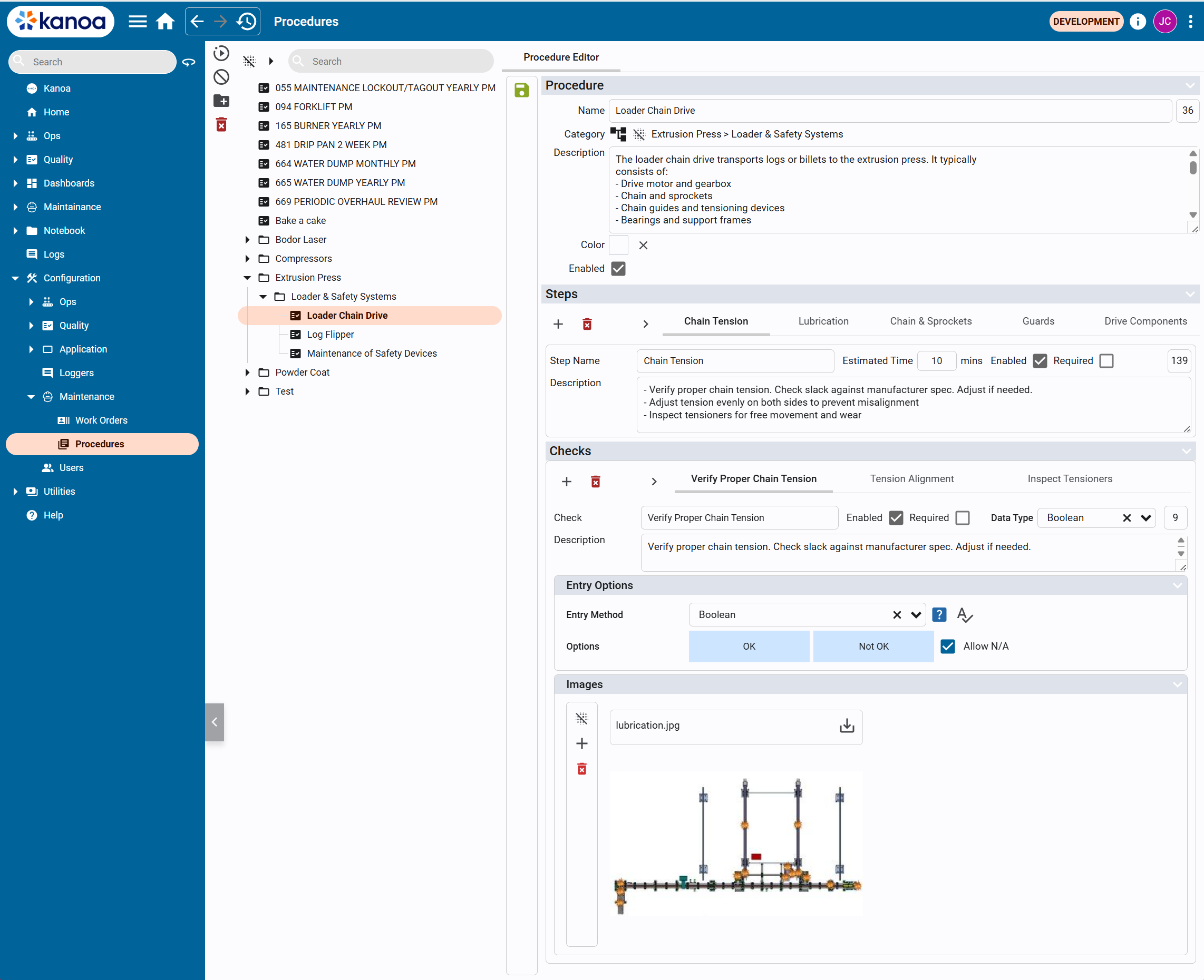
The general workflow is that:
- User defines a procedure
- Procedure is attached to a work order template
- Work orders are generated from the template
- Technicians execute the procedure step-by-step
- Results are recorded through checks
Steps
Steps represent the major phases of a procedure. Each step includes:
- Step Name (e.g., Chain Tension)
- Estimated Time (in minutes)
- Enabled / Required flags
- Description
Steps are typically sequential and guide the technician through the overall workflow.
Checks
Checks are detailed tasks or validations within each step.
They define exactly what the technician must verify or perform.
Each check includes:
- Check Name
- Description
- Enabled / Required flags
- Data Type (how results are captured)
- Entry Options define how the technician records the result of a check.
- Images can be attached to a check to provide visual guidance, reference diagrams and/or inspection points.