Run Production
A run is a stretch of time your machine spends making one product. Kanoa measures everything against the run: the count, the rate and the OEE. This lesson shows you how to start a run, follow how it's doing, and end it.
You start and end runs from Run Control. Opening it needs the Operate Assets security function.
Open Run Control
Tap the Production card at the top of the info panel. It shows the machine's current mode, such as Idle. Run Control opens as a popup.
Start and End Runs (Run Control)
- Select production orders and start and end production runs
- Start and end non production order runs
- Select a scheduled event
- Change the mode of an asset to 'idle', 'maintenance', 'changeover', or any other defined mode associated with the asset.
Run Control is where a run starts and ends. Tap the info panel's Production card to open it as a popup; it needs the Operate Assets security function.
Run Control has four tabs. Select what to run on one of them, then click Start Run at the top:
- Schedule: run an event scheduled on the asset.
- Orders: run a production order. The tab lists the orders that can run on this asset: those in an order state with Can Execute ticked (see Order States).
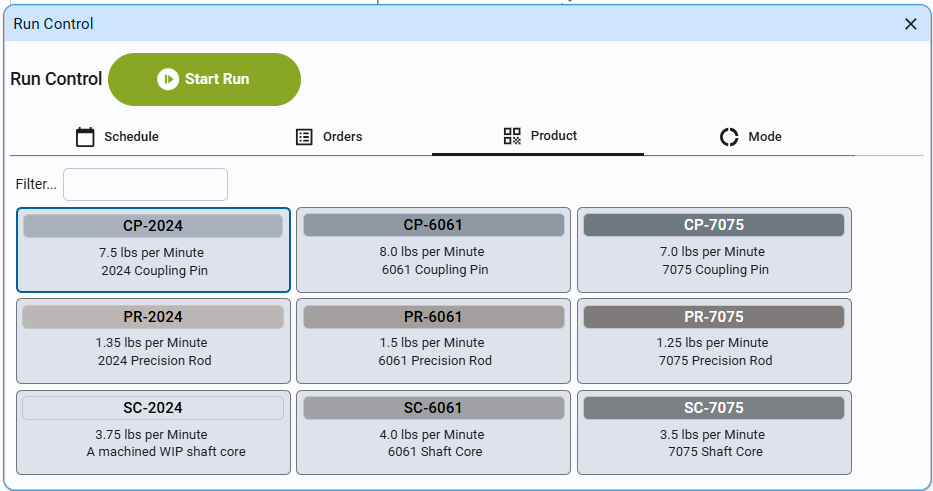
- Product: run an item without an order. Each card shows the item, its rate on this asset and its description; Filter... narrows the list.
- Mode: put the asset into Idle, Maintenance, Changeover or any other mode defined for it. Changing out of a Production mode ends the run.
Start a Run
Your plant runs either from production orders (each order says what to make and how many) or straight from a product. Use whichever your supervisor has told you to.
From a Production Order
- In Run Control, select the Orders tab. It lists the orders you can start on this machine.
- Select the order you're starting.
- Click Start Run, then close Run Control.
If the order you expect isn't on the list, it may not be released yet, or it may be scheduled on another machine. Ask your supervisor or scheduler.
From a Product
- In Run Control, select the Product tab.
- Select the product you're making.
- Click Start Run, then close Run Control.
Either way, the Production card now shows Production with the product and order, and the State card shows whether the machine is running.
Some plants add a step before a run starts, such as a setup checklist or setpoints to confirm. If a popup opens when you click Start Run, follow it through: it's your plant's own step, and the run starts when you finish it.
Follow the Run
While the run goes, keep an eye on the Current Run tab under the cards:
- Output: how much you've made, at what rate, and how much was wasted.
- KPIs: your count against the target, your rate against the standard rate, and OEE.
If the machine runs slower than its standard rate, a Speed loss card appears on the info panel, saying how far below it is. You'll see how to give it a reason in Record Downtime.
End a Run
When the order is finished, or you stop making the product:
- Tap the Production card to open Run Control.
- Select the Mode tab, and select the mode that matches what the machine does next: Idle if it's waiting, or Changeover if you're setting up for the next product.
- Click the button at the top of Run Control to change to that mode, then close Run Control.
Changing the mode ends the production run. Time in a mode such as Idle or Maintenance isn't counted against your run's OEE.
Check Your Understanding
- Where do you start a run?
- The order you need isn't on the Orders tab. What are two reasons that could be?
- You've finished an order and the machine will sit waiting for material. What mode do you put it in?
Answers
- In Run Control, opened by tapping the Production card.
- The order isn't released for production yet, or it's scheduled on another machine.
- Idle.