Fit Rules
Fit rules say where a tool may be mounted: a mold built for one press's platen only goes on that press, an insert only goes into the mold bases made for it. They're optional. A tool with no rules fits any machine in its site that uses tooling; once it has one rule, it only mounts where one of its rules allows.
Fit rules are set on the tool editor's Fits On tab, in Configuration > Ops > Tooling.
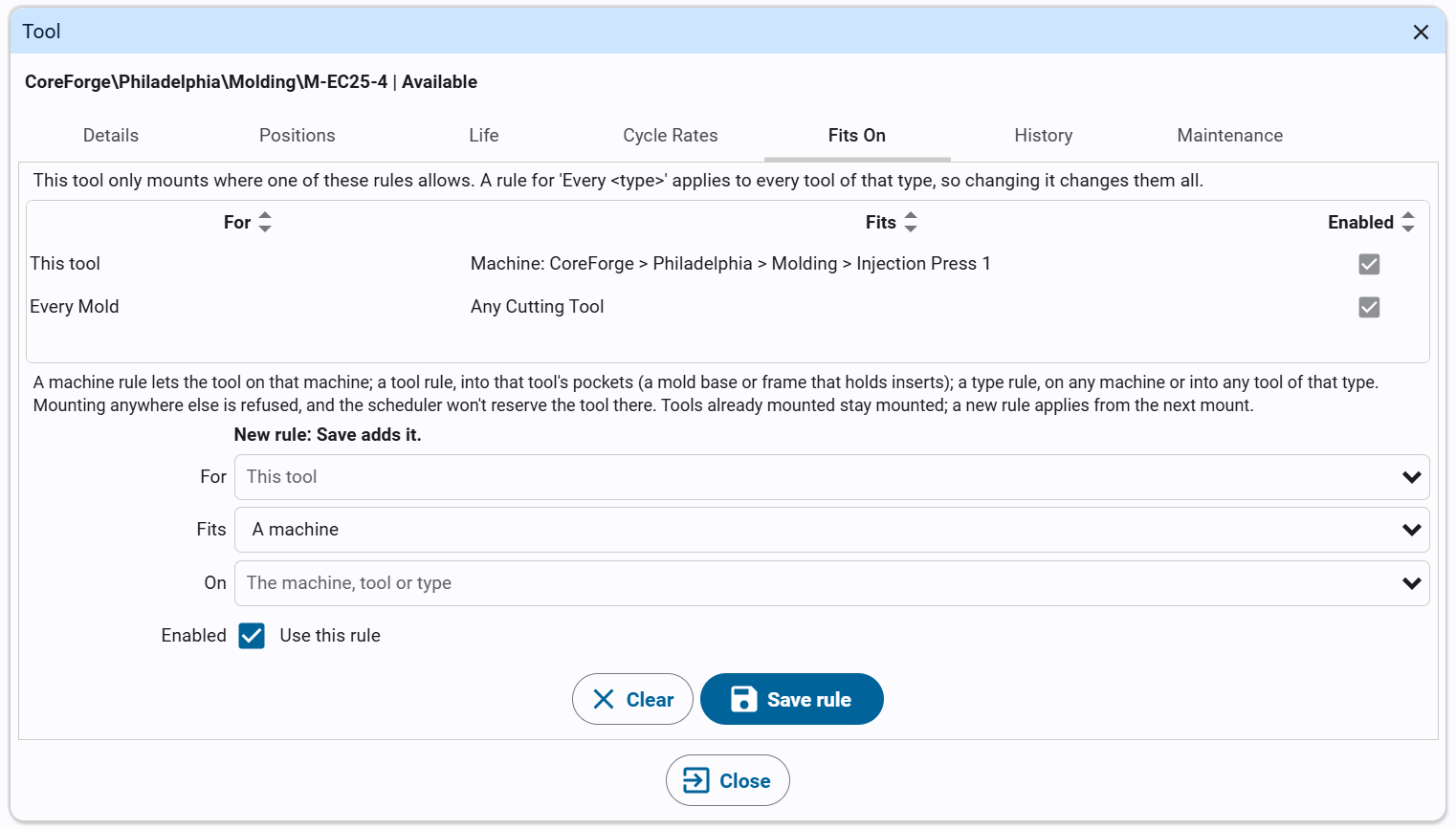
What a Rule Says
| Field | Meaning |
|---|---|
| For | This tool, or Every type (for example Every Mold): a rule for the type applies to every tool of that type, in every site. |
| Fits | A machine: the tool may go on that machine. In a tool's pockets: it may go into that tool, a mold base or frame that holds inserts. Any asset of a type: any machine, or any tool, of that asset type. |
| On | The machine, tool or asset type. A machine must use tooling, and for a rule for this tool, be in the tool's site. |
| Enabled | An unticked rule is kept but restricts nothing. |
A tool can have several rules; it fits wherever any one of them allows. A rule for Every Mold shows on every mold's Fits On tab, and changing it there changes it for all of them.
Adding, Changing and Deleting Rules
- Open the tool (Configuration > Ops > Tooling, select it and click the edit button) and select the Fits On tab. The line at the top says whether the tool has rules: No rules: this tool fits any machine in its site that uses tooling until it does.
- To add a rule, set For, Fits and On, and click Save rule. The line above the form says New rule: Save adds it.
- To change a rule, click it in the list. The line above the form says Editing: and the rule; change it and click Save rule. Clear empties the form to add a new rule instead.
- To delete a rule, click it in the list and click Delete selected.
The first rule a tool gets limits it at once: the toast says This tool now only mounts where its rules allow.
What Rules Do
- Mounting a tool where none of its rules allows is refused, on the Operator Station's mount panel and through the
machine's
Toolingtags. For a mold base with inserts, each insert is checked against the base too. See Mounting Tools. - Scheduling doesn't reserve a tool where it doesn't fit: an operation that needs any Mold is given a mold that fits its machine, and a specific tool that doesn't fit is a hard conflict (M-100 doesn't fit Press 2) in the event editor. See Required Tooling.
- Tools already mounted stay mounted: a new rule applies from the next mount.
Scripts can read and change rules with system.kanoa.tooling.getCompatibilityRules, saveCompatibilityRule and
deleteCompatibilityRule, and check a mount with checkCompatibility.