Get Orders from ERP
In this section, we will set up an ERP simulator so we can call our web service endpoint sendMO with a payload containing production order information.
Click to view example payload from ERP
{
    "metaData": {
        "machineSetpoints": [
            1,
            2,
            3,
            4,
            5
        ]
    },
    "order": {
        "orderType": "PRODUCTION",
        "notes": "",
        "updatedBy": null,
        "assetGroupName": "BATCH",
        "scheduleInfo": {
            "rateInfo": {
                "period": "hour",
                "equipmentRate": 400,
                "budgetRate": 0
            },
            "enabled": true,
            "assetName": "260410AP01",
            "startDate": "2026-05-14 19:30"
        },
        "dueDate": "2026-05-31",
        "lotNumber": "",
        "itemClassPath": "Training\\260410\\FG",
        "itemName": "FG-CP-2024-STD-250",
        "uom": "Boxes",
        "createdBy": "erp",
        "itemPath": "Training\\260410\\FG\\FG-CP-2024-STD-250",
        "orderQty": 500,
        "itemDescription": "250ct 2024 Standard Coated Coupling Pins",
        "manufacturingOrder": "ERP-Test-012",
        "status": "Released"
    }
}
Normally the ERP would be on a different machine, but we will install the ERP simulator on the same gateway. It still makes web service calls; they just go to the same machine.
- download the following resources.
kanoaERPSim_project.zip: an Ignition project that plays the part of the customer's ERP system.erpSim-tags.json: the tags the simulator uses for its messages and its list of MES servers.
- On the Gateway web page, go to Config → Projects and import
kanoaERPSim_project.zip(downloaded above). Name the project exactlykanoaERPSim, because the project name is part of the simulator's own web service URLs. - In the Ignition Designer, import
erpSim-tags.jsonat the root of theKanoatag provider. This creates anerpSimfolder with three tags:message,woUpdate, andMES Server List. - On the Gateway web page, go to Home → View Projects and open
Kanoa ERP Simulator.
The erp simulator is defaulted to call the endpoint /system/webdev/KANOA_SCRIPTS_/api/sendMO at http://localhost:8088.
If your gateway name is different or you have created the endpoint in a different project or with a different name. You can change it by double-clicking in the table and setting it.
Copy your actual endpoint
You can copy your actual endpoint by right clicking on your endpoint under WebDev in the KANOA_SCRIPTS project.
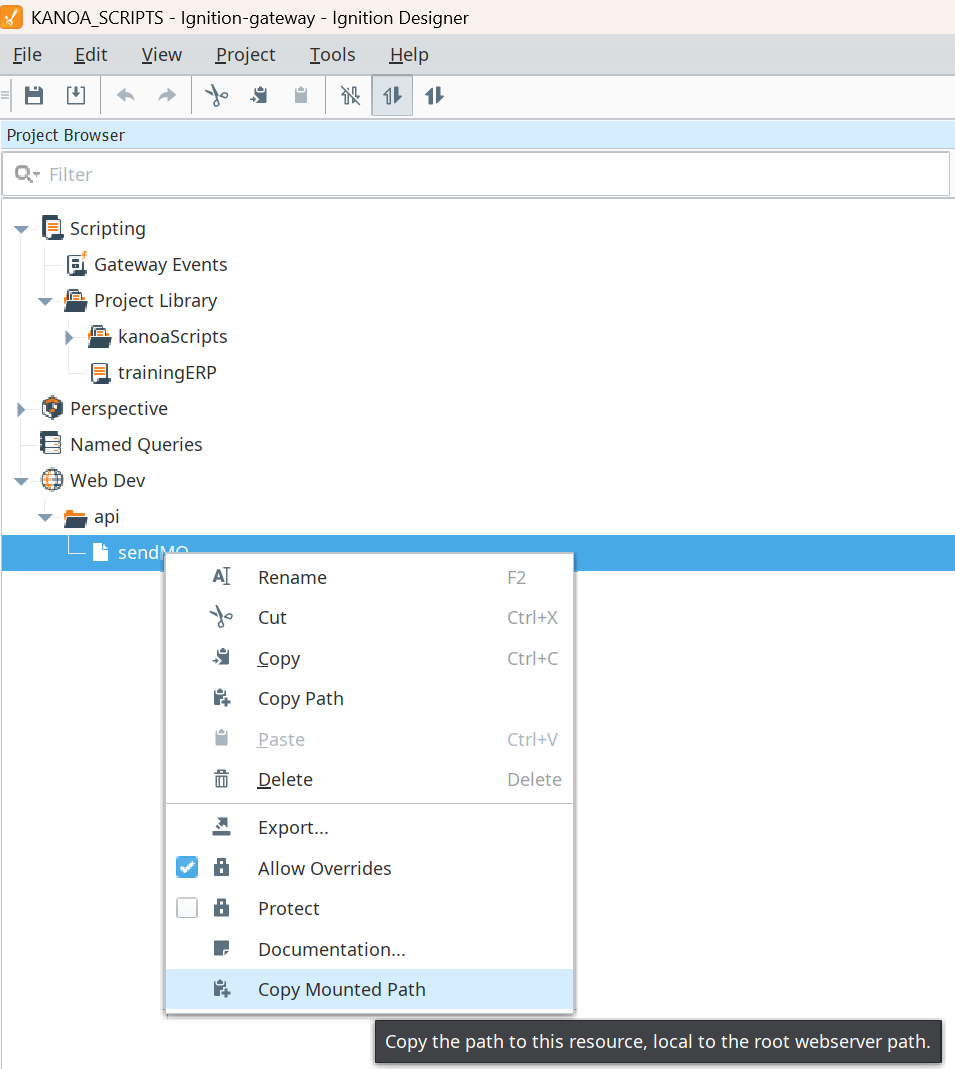
- Create a new production order i.e.
PO#1234and clickSend to MESfrom the ERP simulator project.
Verify that:
- The WebDev endpoint receives the request.
- The script returns a success response.
- Navigate to Ops → Scheduling → Production Orders and verify the production order is there.
- Check the Gateway logs for errors
- Confirm the WebDev resource is enabled and the endpoint path is correct
- Confirm the request uses POST
- Confirm the script library name matches the WebDev call
- Confirm the order status is
Released
We'll now extend this so that production orders received from ERP are not only created, but also scheduled.
ERP asset naming may be wholly different from what you end up calling your assets in MES. We recommend naming the assets exactly how operations knows them. We can use asset custom attributes to link them together.
- Navigate to Configuration → Ops → Assets.
- Select
Manual Pack 1. - Add a custom attribute named
erpName. - Set its value to
AP01. This is the ERP asset name you'll send in thescheduleInfo.assetNamefield of the payload.
- Send a new order from the simulator with the scheduled asset set to
AP01and confirm the order is created or updated. - Navigate to Ops → Scheduling → Operations, select
Manual Pack 1, and confirm the schedule block was created. - Send an updated payload and confirm the schedule block updated.
- Send a closed-order payload and confirm future schedule blocks are removed.
Copy this script into the Ignition Designer Script Console (Tools → Script Console) and run it with the KANOA_SCRIPTS project open. It checks:
- The
erpSimtags exist, and the MES Server List has an enabled server the gateway can reach. - The
kanoaERPSimproject is installed. - The
trainingERPlibrary has all of its functions. - The
sendMOendpoint answers and callstrainingERP.sendMO. It posts an empty order, whichsendMOrejects without changing anything. The script runs on your computer, so if it can't reach the gateway's web server from there (for example, a gateway in Docker), it skips this test and relies on the next one. Manual Pack 1haserpName = AP01.- At least one ERP order arrived and is scheduled on
Manual Pack 1.
Each check prints PASS or FAIL with what to fix.
Show the check script
# Kanoa Ops Training - check "Create Web Service" and "Get Orders from ERP"
#
# Run in the Ignition Designer Script Console (Tools > Script Console) with the
# KANOA_SCRIPTS project open (or a project that inherits it, such as kanoaMES),
# so the console can see the trainingERP library.
# It doesn't create or change anything. The endpoint test posts an empty order,
# which sendMO rejects before touching Kanoa.

MANUAL_PACK = 'CoreForge\\Philadelphia\\Finishing\\Manual Pack 1'
ERP_NAME = 'AP01'
TAGS = '[Kanoa]erpSim'
FUNCTIONS = ['sendMO', 'updateWOTag', 'validateRequiredFields', 'parseDate', 'removeFutureBlocks']
ENDPOINT_PATHS = ['/system/webdev/KANOA_SCRIPTS/api/sendMO', '/system/webdev/kanoaMES/api/sendMO']

results = []

def check(ok, what, fix=None):
	results.append(bool(ok))
	if ok:
		print 'PASS  %s' % what
	else:
		print 'FAIL  %s' % what
		if fix:
			print '      -> %s' % fix

def note(what):
	print 'NOTE  %s' % what

def text(v):
	return '' if v is None else unicode(v).strip()

def rows(data):
	# Kanoa returns a dataset, a list, or None when there's nothing to return
	if data is None:
		return []
	if hasattr(data, 'getRowCount'):
		cols = list(data.getColumnNames())
		return [dict((c, data.getValueAt(i, c)) for c in cols) for i in range(data.getRowCount())]
	return [dict(r) for r in data]

print '=' * 70
print 'Kanoa Ops Training - ERP integration check'
print '=' * 70

# 1. ERP simulator tags (erpSim-tags.json)
print '\n-- ERP simulator tags'
servers = []
for name in ['message', 'woUpdate', 'MES Server List']:
	check(system.tag.exists('%s/%s' % (TAGS, name)), '%s/%s exists' % (TAGS, name),
		'In the Tag Browser, select the Kanoa provider and import erpSim-tags.json at the root.')
if system.tag.exists(TAGS + '/MES Server List'):
	serverList = rows(system.tag.readBlocking([TAGS + '/MES Server List'])[0].value)
	servers = [text(r.get('url')) for r in serverList if str(r.get('enabled')).lower() in ('true', '1')]
	check(servers, 'The MES Server List has an enabled server',
		'Open Kanoa ERP Simulator and enable a server, e.g. http://localhost:8088.')
	for url in servers:
		check('localtest.me' not in url.lower(), 'Server %s is reachable from the gateway' % url,
			'The simulator calls this from the gateway itself, where *.localtest.me points back at the gateway '
			'and nothing listens on that port. Use http://localhost:8088 instead.')

# 2. ERP simulator project
print '\n-- ERP simulator project'
try:
	projects = list(system.project.getProjectNames())
	check('kanoaERPSim' in projects, 'Project kanoaERPSim exists',
		'On the Gateway, go to Config > Projects and import kanoaERPSim_project.zip with the name kanoaERPSim.')
except:
	note("Can't list projects from here; check that kanoaERPSim appears under the Gateway's projects.")

# 3. trainingERP script library
print '\n-- trainingERP script library'
try:
	library = trainingERP
except NameError:
	library = None
check(library is not None, 'trainingERP library is visible from this project',
	'Create the trainingERP script library in KANOA_SCRIPTS, and run this check with KANOA_SCRIPTS '
	'(or a project that inherits it) open in the Designer.')
if library is not None:
	missing = [f for f in FUNCTIONS if not hasattr(library, f)]
	check(not missing, 'trainingERP has %s' % ', '.join(FUNCTIONS),
		'Missing %s. Replace the library with the full code block from Create Web Service.' % ', '.join(missing))
	if not missing:
		ok, msg = library.validateRequiredFields({})
		check(not ok, 'validateRequiredFields rejects an empty order', "It returned %s. Re-copy the code block." % ok)
		check(library.parseDate('2026-05-31') is not None and library.parseDate('2026-05-14 19:30') is not None,
			'parseDate reads ERP dates', 'Re-copy the code block from Create Web Service.')

# 4. The sendMO endpoint answers and calls trainingERP.sendMO
print '\n-- sendMO WebDev endpoint'
# The simulator calls the server list's address from the gateway. This console runs on the
# Designer's computer, where that address (e.g. localhost:8088 inside Docker) may not reach the
# gateway, so try every gateway address we can find. If none can be reached from here, the
# "Orders received from ERP" check below still proves the endpoint works end to end.
import re, sys
bases = []
try:
	bases.append(system.util.getGatewayAddress())
except:
	pass
try:
	bases.append(system.tag.readBlocking(['[System]Client/Network/GatewayAddress'])[0].value)
except:
	pass
bases = [re.sub(r'(https?://[^/]+).*', r'\1', text(b)) for b in bases if text(b).startswith('http')]
client = system.net.httpClient(timeout=5000, bypass_cert_validation=True)

def post(url):
	# Returns (response, error). Catches Java errors too, which 'except Exception' misses.
	try:
		return client.post(url, data=system.util.jsonEncode({}), headers={'Content-Type': 'application/json'}), None
	except:
		err = sys.exc_info()[1]
		return None, text(getattr(err, 'message', None) or err).split('\n')[0]

endpointUnreachable = False
for server in servers:
	paths = [server[server.index('/system/webdev/'):]] if '/system/webdev/' in server else ENDPOINT_PATHS
	serverBase = re.sub(r'(https?://[^/]+).*', r'\1', server)
	tried, answered, missing = [], None, []
	for base in bases + [serverBase]:
		if base in tried:
			continue
		tried.append(base)
		for path in paths:
			resp, error = post(base + path)
			if error:
				break	# this address isn't reachable from here; try the next one
			if resp.statusCode == 404:
				missing.append(base + path)
				continue
			answered = (base + path, resp)
			break
		if answered or missing:
			break
	if answered:
		url, resp = answered
		try:
			reply = system.util.jsonDecode(resp.text) or {}
		except:
			reply = {}
		check(resp.statusCode == 200 and 'No order information' in text(reply.get('msg')),
			'%s calls trainingERP.sendMO' % url,
			'It returned HTTP %s: %s. Check that doPost calls trainingERP.sendMO(body) and that the project is saved.'
			% (resp.statusCode, text(resp.text)[:200]))
	elif missing:
		check(False, 'sendMO endpoint found for %s' % server,
			'Got 404 for %s. Create the api/sendMO WebDev resource in KANOA_SCRIPTS (doPost, enabled), '
			'and make the MES Server List point at its mounted path.' % ', '.join(missing))
	else:
		endpointUnreachable = True
		note("Couldn't reach the gateway's web server from the Designer (tried %s), so the endpoint wasn't called directly. "
			"The 'Orders received from ERP' check below confirms it works." % ', '.join(tried))

# 5. erpName attribute on Manual Pack 1
print '\n-- ERP asset name'
attrs = rows(system.kanoa.asset.getAssetAttributes({'assetPath': MANUAL_PACK, 'assetAttrName': 'erpName'}))
value = text(attrs[0].get('assetAttrValue')) if attrs else ''
check(value == ERP_NAME, 'Manual Pack 1 has erpName = %s' % ERP_NAME,
	("It's '%s'. " % value if attrs else '') + 'In Configuration > Ops > Assets, select Manual Pack 1 and set the erpName custom attribute to %s.' % ERP_NAME)

# 6. Orders received from ERP
print '\n-- Orders received from ERP'
orders = [r for r in rows(system.kanoa.order.getProductionOrders({'ignoreActualQty': True}))
	if text(r.get('workOrderSourceName')) == 'ERP']
check(orders, 'At least one production order came from ERP',
	'Open Kanoa ERP Simulator, fill in an order and click Send to MES.')
for r in orders[:10]:
	note('%s: %s x %s %s, %s' % (text(r.get('workOrderName')), text(r.get('itemName')), text(r.get('reqdQty')),
		text(r.get('itemUnitName')), text(r.get('workOrderStatusName'))))
if len(orders) > 10:
	note('... and %d more' % (len(orders) - 10))

names = set(text(r.get('workOrderName')) for r in orders)
blocks = [b for b in rows(system.kanoa.schedule.getScheduleBlocks({'assetPath': MANUAL_PACK}))
	if text(b.get('workOrderName')) in names]
check(blocks, 'An ERP order is scheduled on Manual Pack 1',
	'Send an order from the simulator with the schedule enabled and the asset set to %s.' % ERP_NAME)

states = [text(r.get('workOrderStatusName')) for r in rows(system.kanoa.order.getProductionOrderStates({}))]
if 'Scheduled' not in states:
	note("Optional: there's no 'Scheduled' order status, so scheduled ERP orders stay Released.")

passed = results.count(True)
print '\n' + '=' * 70
print 'Result: %d of %d checks passed' % (passed, len(results))
if passed == len(results):
	print 'All good. ERP orders are reaching Kanoa.'
else:
	print 'Fix the FAIL items above, then run this again.'
print '=' * 70